• Company
    • About Us
    • Case Studies
    • Press Center
    • Careers
    • Blog
    • Contact us
  • Contact us
  • Login
 
  • English
    • Deutsch
    • Español
    • Français
    • Italiano
    • Português
Paessler
                    - The Monitoring Experts
  • Products
    • Paessler PRTG
      Paessler PRTGMonitor your whole IT infrastructure
      • PRTG Network Monitor
      • PRTG Enterprise Monitor
      • PRTG Hosted Monitor
      • PRTG UVexplorer
      • PRTG extensionsExtensions for Paessler PRTGExtend your monitoring to a new level
    • Icon Features
      FeaturesExplore all monitoring features
      • Maps & dashboards
      • Alerts & notifications
      • Multiple user interfaces
      • Distributed monitoring
      • Customizable reporting
  • Solutions
    • Industries
      IndustriesMonitor various industry sectors
      • Industrial
      • Healthcare
      • Data Center
      • Education
      • Finance
      • Government
    • IT Topics
      IT TopicsMonitor all areas of IT
      • Network Monitoring
      • Bandwidth Monitoring
      • SNMP Monitor
      • Network Mapping
      • WiFi Monitoring
      • Server Monitoring
  • Pricing
  • Resources
    • Getting Started
      Getting StartedModules for self-paced learning
    • How-to Guides
      How-to GuidesGet the most out of PRTG
    • Videos & Webinars
      Videos & WebinarsLearn from Paessler experts
    • IT  Knowledge
      IT KnowledgeExpand your IT knowledge
    • PRTG Manual
      PRTG ManualFull documentation
    • Knowledge Base
      Knowledge BaseShare community knowledge
    • PRTG Sensor Hub
      PRTG Sensor HubGet sensors, scripts & templates
    • Trainings
      PRTG TrainingLearn how to work with PRTG
  • Partners
    • Icon Handshake
      Become a PartnerFor resellers and channel partners
    • Icon MSP
      Become an MSPDeliver monitoring as a managed service
    • icon partner
      Partner PortalLog in to your partner account
    • Deal Registration
      Deal RegistrationRegister your sales opportunities
    • icon search
      Find a PartnerFind partners selling Paessler products
    • icon technology
      Technology AlliancesSee Paessler technology partnerships
    • Partner HubTools for Your Success
  • Company
    • About Us
    • Case Studies
    • Press Center
    • Careers
    • Blog
    • Contact us
  • Contact us
  • Login
  • English
    • Deutsch
    • Español
    • Français
    • Italiano
    • Português
  • Get a quote
  • Free trial

Proactive Database Monitoring Tool

Use real-time alerts, query performance tracking, and full observability across your database environments to spot database issues before users do

Free download
PRODUCT OVERVIEW

What should you monitor to keep your databases performing reliably?

Database performance issues rarely announce themselves cleanly. Slow queries, connection pool exhaustion, resource saturation on the host, or a cloud instance running out of IOPS: each one shows up differently, and tracking them across multiple database platforms and environments without a unified view means gaps. Most teams find out something went wrong from an application error or a user complaint, not from their monitoring.

Paessler PRTG connects to databases via native protocols, ODBC/ADO connections, and cloud provider APIs, covering both on-premises and cloud environments in one place. Custom SQL queries run at intervals you define, execution time is measured at the connection and query level separately, and threshold-based alerts fire before resource limits or performance degradations reach applications. Supported platforms: Microsoft SQL Server, MySQL, PostgreSQL, Oracle, Azure SQL Database, AWS RDS (MySQL, PostgreSQL, MariaDB, Oracle, SQL Server), and any ODBC/ADO-compatible database.

Download PRTG Trial

What you will find on this page

  • Database Observability
  • How PRTG Monitors Databases
  • Database Monitoring: Manual vs. PRTG
  • FAQs

PRTG is compatible with all major vendors, products, and systems

compatible with all major vendors, products, and systems

Database Observability Across Every Layer of Your Environment

Track Query Performance and Optimize Execution 

Slow queries degrade application response times. Usually you only find out when users start complaining, and by then you're already in reactive mode. PRTG runs your custom SQL queries at defined intervals and measures execution time for each statement, connection overhead included. When execution time creeps past your defined threshold PRTG fires an alert, giving you time to optimize queries before they hit production workloads.
  • Execute custom SQL queries stored as script files on intervals you define
  • Measure execution time for complete requests and query execution separately
  • Configure threshold-based alerts on execution time to catch performance issues early
  • Track affected rows and result set sizes to spot inefficient queries
  • Compare performance metrics across database instances to find where bottlenecks occur
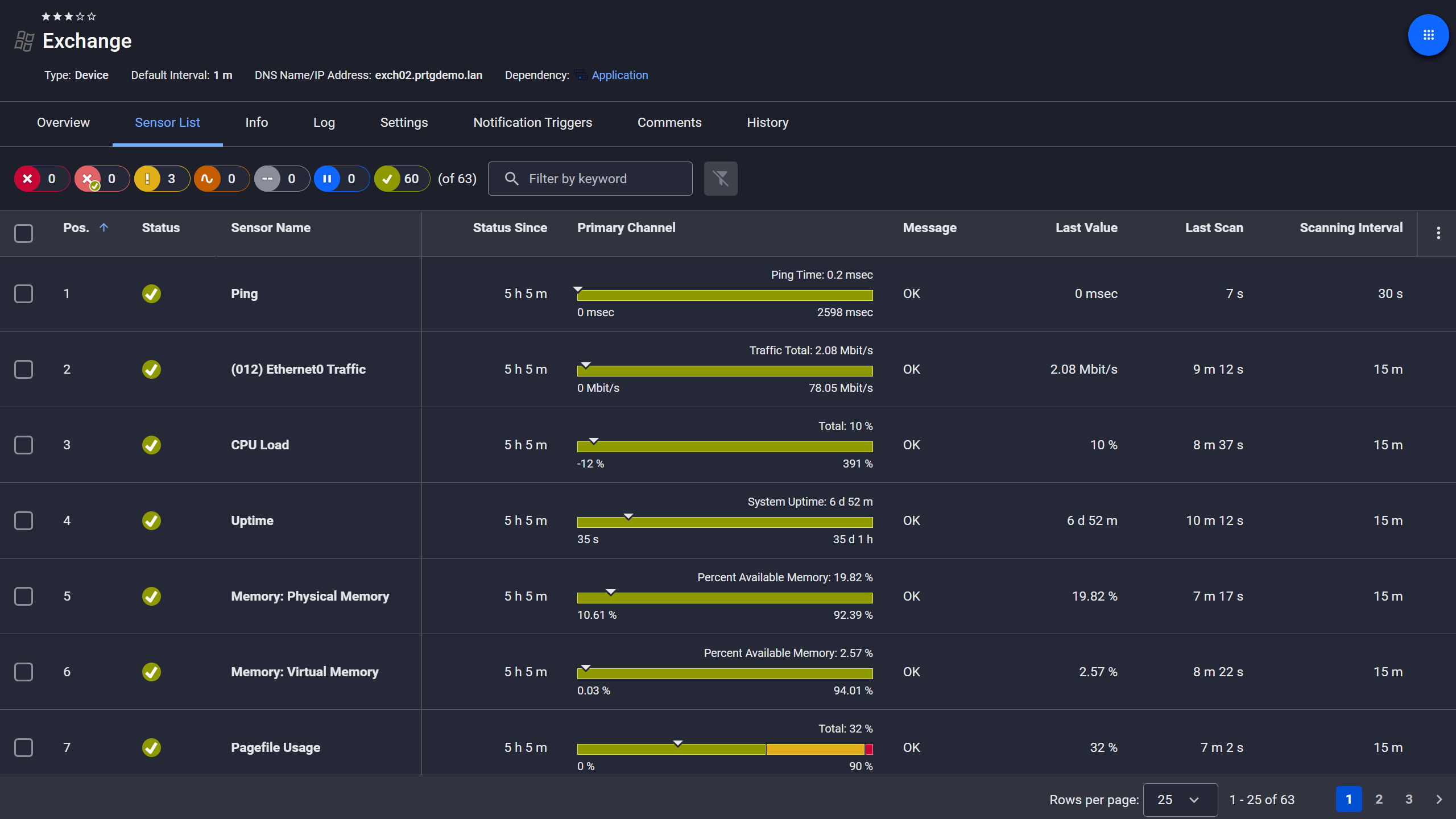
PRTG device view showing sensor list for a monitored Microsoft Exchange server

Exchange server, fully under control

PRTG web interface showing live performance graphs for a Probe Health sensor

Live graphs, real-time performance data
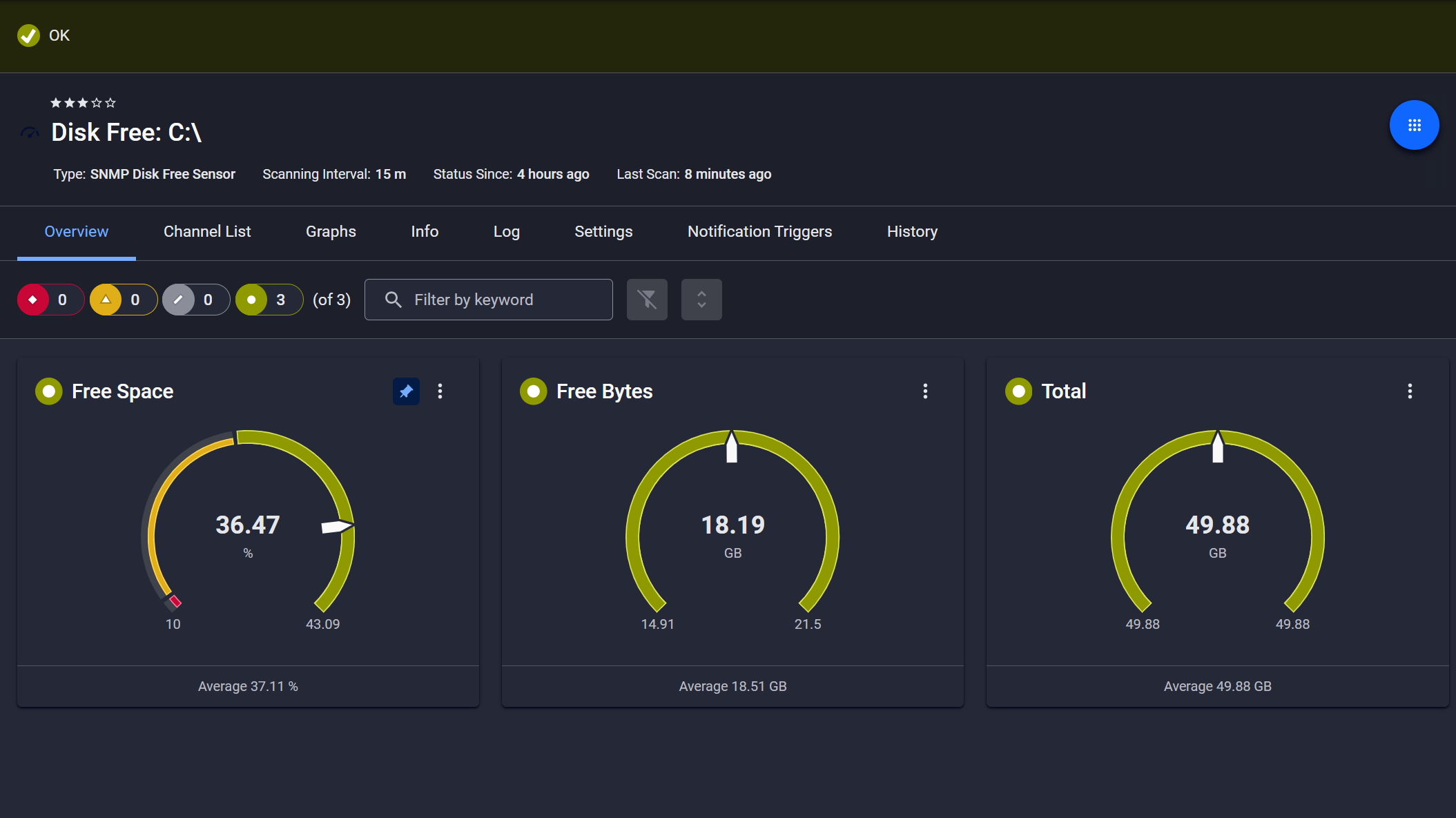
PRTG SNMP Disk Free sensor showing free space, free bytes, and total disk capacity gauges

Disk space monitored, alerts ready

Prevent Downtime with Connection Health Monitoring 

Connection failures cause complete application outages. By the time users report it, you're already behind. PRTG runs health-check queries at intervals you define, watching for connection timeouts, authentication failures, and service unavailability. When a database instance becomes unreachable, you get immediate notifications so issue resolution starts before downtime escalates.

  • Execute health-check queries to validate database connectivity and response
  • Monitor for connection timeouts, authentication failures, and service interruptions
  • Track database-specific availability metrics including connection pool status
  • Configure immediate notifications when instances enter error states
  • PRTG stores historical availability and performance data that can be used in customizable reports for SLA evaluations and long‑term trend analysis

See Why IT Professionals Trust PRTG

Start monitoring your infrastructure in minutes. No professional services, no complex configuration, no risk.

Free download
PRODUCT OVERVIEW

Infrastructure Monitoring Across Database Environments 

Resource exhaustion causes performance degradation and unexpected outages, and tracking CPU, memory, and I/O across different database platforms is not simple. PRTG pulls resource metrics for both on-premises databases and cloud instances through native protocols and APIs. Set thresholds on CPU load, memory consumption, and disk I/O, and you get alerted before resources become constrained. That gives you time to plan for scalability before it becomes an actual problem.This is a bullet point

  • Monitor CPU utilization, memory usage, and disk I/O for on-premises database servers
  • Track cloud database metrics including IOPS, throughput, network traffic, and connection counts for Azure SQL and AWS RDS
  • Set alert thresholds on resource consumption to prevent performance issues before they escalate
  • Use historical resource data to identify usage trends and plan capacity
  • Correlate resource metrics with query performance to isolate infrastructure constraints
PRTG reports list showing scheduled monitoring reports with run times and sensor counts

Scheduled reports, always on time

PRTG tickets list showing system notifications, report completions, and update alerts

Tickets keep your team aligned

PRTG web interface showing device tree and full device list with sensor status badges

Full device list, instant overview

Troubleshooting Database Errors with Accelerated Analysis 

Database errors and failed transactions often hide in application logs. That makes troubleshooting slow, and finding the actual root cause even slower. PRTG runs validation queries against error tables or other quarriable structures exposed by the database and surfaces issues in near real-time. The access depends on the database making this information available through SQL queries. So when you correlate database performance data with infrastructure metrics, you can tell fast whether the problem comes from database configuration, query inefficiency, or system resource constraints.

  • Validate error conditions through custom SQL queries checking application-specific error tables
  • Monitor transaction metrics such as success rates and rollback counts if your database exposes these values through tables
  • Correlate database performance issues with CPU, memory, and network metrics
  • Highlight SQL result anomalies; the validation logic stays in you SQL queries
  • Use historical performance data to distinguish sudden degradation from gradual decline

How PRTG Monitors Databases  

To easily start database monitoring with PRTG you use preconfigured monitoring sensors that collect specific data types from your infrastructure. Database sensors connect through native protocols, ODBC/ADO interfaces, and cloud APIs to give you database observability across performance, availability, and resource metrics.

SQL Query Execution

PRTG's database sensors connect to Microsoft SQL Server, MySQL, PostgreSQL, and Oracle using native database protocols, or monitor any database through ODBC/ADO connections using the ADO SQL v2 sensor. You store custom SQL queries as script files and configure sensors to run them at intervals you set. By default, 5 minutes is the recommended interval for production databases. The sensors then measure execution time for the complete request, connection buildup and overhead included, and separately for the query itself. All in milliseconds.

Custom Monitoring Channels

Database sensors extract specific values from query result sets and map them to monitoring channels, individual data streams within a sensor that each track a specific metric. The ADO SQL v2 sensor monitors row counts for SELECT statements or tracks affected rows for INSERT/UPDATE/DELETE operations. What kind of data points can you track? Error counts, record totals, application-specific metrics, whatever your queries return. You configure multiple custom channels per sensor, and such a setup is what makes effective database monitoring possible across very different application types.

Cloud API Integration

Cloud database sensors pull metrics via native cloud provider APIs, no direct database connection required. The Microsoft Azure SQL Database sensor monitors CPU utilization, connection counts, data space usage, DTU consumption, and deadlock counts for SaaS database instances. The AWS RDS v2 sensor tracks IOPS, read/write latency, network throughput, CPU usage, freeable memory, and storage space across MySQL, PostgreSQL, Oracle, MariaDB, and SQL Server instances. This happens through Azure Monitor and AWS CloudWatch APIs respectively. No agent needed on the database host.

Alerts and Notifications

You configure alert thresholds on any channel within your database sensors: execution time, error counts, resource utilization, or custom metrics your queries return. Notification channels include email, SMS, push notifications, syslog, and webhook integrations. Also worth setting up: escalation chains and maintenance windows, which keep alert fatigue manageable during planned maintenance. You define the rules, PRTG handles the rest.

Result Handling and Transaction Testing 

Configure how database sensors process query results: discard data after measurement, store values for historical tracking, or use results for validation logic. For testing data modification operations in production environments, you can include transaction handling such as rollback or commit behavior within your SQL scripts. This logic must be defined at the query level in the script itself, as PRTG simply executes the script and dies not apply any sensor-level transaction handling.

free downLoad

Database Monitoring: Manual vs. PRTG

Task

Without PRTG

Without PRTG

With PRTG

With PRTG

Query Performance Tracking

Without PRTG
not included

Run queries manually, check execution plans, log timestamps

With PRTG
included

Automated query execution with millisecond-level execution time tracking

Multi-Database Visibility

Without PRTG
not included

Log into each database platform separately, compare metrics manually

With PRTG
included

Single dashboard for SQL Server, MySQL, PostgreSQL, Oracle, and cloud databases

Error Detection

Without PRTG
not included

Check error logs periodically, search for failed transactions

With PRTG
included

Automated validation queries with threshold-based alerts on error conditions

Resource Monitoring

Without PRTG
not included

Check task manager, database-specific tools, cloud consoles

With PRTG
included

Unified resource metrics across on-premises and cloud with historical trend data

Alert Configuration

Without PRTG
not included

Set up database-specific alerts per platform, manage multiple notification systems

With PRTG
included

Centralized threshold configuration with multi-channel notifications: email, SMS, syslog, webhook

free downLoad

“With PRTG, we can comprehensively monitor our email services in the cloud, and ensure that – as the team in charge – we are immediately informed in the event of a malfunction and can quickly take actions to fix it. It wasn’t until we started using PRTG that we realized how error-ridden our Microsoft cloud service can be.”

Monitoring expert
Oettinger Davidoff

“Part of our infrastructure runs with Azure. This information is then sent to PRTG via Powershell. Paessler is a great solution for us. We get alerts sent directly to our phones and if something goes wrong somewhere, we can immediately deal with it. It’s our lifeline. This is why Paessler gives us a sense of security no matter what the time of day.”

Gert-Jan Hiddink, DevOps Engineer
CowManager

“As more and more companies start to integrate new systems, they aren’t going to use legacy networks. Instead, clients are implementing more cloud-based solutions with newer programming languages. Being able to closely monitor cloud-based solutions and customize sensors based on clients’ needs is extremely helpful in making sure the process runs and continues to function as smoothly as possible.”

Edgard Concha, Director of Information Systems
Resolvit

Paessler PRTG Network Monitor licenses & pricing

Choose the PRTG Network Monitor subscription that's best for you.

License NameLicense descriptionPriceLicense DetailsGet startedPricing Details
PRTG 500$200per month paid annuallyBuy nowBuy now

Enough to monitor multiple aspects of 50 devices

PRTG 1000$358per month paid annuallyBuy nowBuy now

Enough to monitor multiple aspects of 100 devices

PRTG 2500$742per month paid annuallyBuy nowBuy now

Enough to monitor multiple aspects of 250 devices

PRTG 5000$1,300per month paid annuallyBuy nowBuy now

Enough to monitor multiple aspects of 500 devices

PRTG 10000$1,642per month paid annuallyBuy nowBuy now

Enough to monitor multiple aspects of 1000 devices

Over 100,000 Customers Worldwide Love Paessler  

customer success stories

 Database Monitoring Tool: Frequently Asked Questions


What databases can PRTG monitor?

PRTG monitors Microsoft SQL Server, MySQL, PostgreSQL, and Oracle through native sensors. Any database that supports ODBC or ADO connections works with the ADO SQL sensor. For cloud environments, PRTG includes dedicated sensors for Azure SQL Database and AWS RDS instances covering MySQL, PostgreSQL, MariaDB, Oracle, and SQL Server.

Can PRTG monitor specific database queries?

Yes. You store custom SQL queries as script files, define the execution interval, and configure which values from the result set become monitoring channels. This gives database administrators the flexibility to monitor application-specific metrics, validate business logic, check error conditions, or test transaction processing, without writing a custom integration.

How does PRTG alert on database performance issues?

Threshold-based alerting. You set upper or lower limits on any metric: query execution time, connection counts, CPU usage, error counts, or custom values your queries return. When a threshold is exceeded PRTG sends notifications through whatever channels you've configured: email, SMS, syslog, push notifications, webhook.

Does PRTG require agents on database servers?

The short answer: No. For on-premises databases, PRTG connects using native protocols: TDS for SQL Server, MySQL protocol, PostgreSQL protocol, Oracle TNS, or ODBC/ADO. Cloud databases go through their provider APIs, Azure Monitor and AWS CloudWatch. You do need database credentials for authentication.

Can PRTG monitor database backup completion?

Yes, through custom SQL queries that check backup history tables or file timestamps. Write a query that returns backup status or completion time, configure alert thresholds if backups are missing or outdated. Worth noting: this requires query-level configuration to account for how your specific database tracks backup status. Not a one-click setup, but straightforward once you know your backup tables.

How often does PRTG check database performance?

You set the scanning interval per sensor. Five minutes is the recommended default for production database monitoring. That interval balances detection speed against performance impact on the monitored instance. Critical instances can run more frequent checks, development databases less frequent ones to reduce load. DevOps teams and database administrators each get the granularity they need without a global compromise.

Paessler PRTG

Paessler PRTG

Network Monitoring Software – Version 26.1.116.1532 (February 9th, 2026)

Hosting icon

Hosting

Download for Windows and cloud-based version PRTG Hosted Monitor available

Languages icon

Languages

English, German, Spanish, French, Portuguese, Dutch, Russian, Japanese, and Simplified Chinese

test

Monitor everything

Network devices, bandwidth, servers, applications, virtual environments, remote systems, IoT, and more

test

Pricing

Choose the PRTG Network Monitor subscription that's best for you

Discover more monitoring insights and stories

Content illustration

Powerful stories from the monitoring world

  • Monitoring databases is vital – and with PRTG it's easy - Paessler Blog
  • PRTG Tutorial: Microsoft Azure SQL Database sensor - Paessler
  • Why Monitoring a Database requires an IT-Professional
Support illustration

Resources to master your monitoring challenges

  • PRTG Manual: Monitoring Databases - Paessler
  • PRTG Manual: Microsoft Azure SQL Database Sensor - Paessler
  • PRTG Manual: Exchange Database (PowerShell) Sensor - Paessler
Solution illustration

Solutions for all your monitoring needs

  • Database Monitoring
  • Oracle Monitoring
  • Database Performance Monitoring
PRTG Logo

Start Monitoring with PRTG and see how it can make your network more reliable and your job easier.

Free download
PRODUCT OVERVIEW

Products

  • Paessler PRTG
    Paessler PRTGMonitor your whole IT infrastructure
    • PRTG Network Monitor
    • PRTG Enterprise Monitor
    • PRTG Hosted Monitor
    • PRTG UVexplorer
    • PRTG extensions
      Extensions for Paessler PRTGExtend your monitoring to a new level
  • Icon Features
    FeaturesExplore all monitoring features

Monitoring with PRTG

  • Network monitoring
  • Bandwidth monitoring
  • SNMP monitoring
  • Network mapping
  • Wi-Fi monitoring
  • Server monitoring
  • Network traffic analyzer
  • NetFlow monitoring
  • Syslog server

Useful Links

  • PRTG Manual
  • Knowledge Base
  • Customer Success Stories
  • About Paessler
  • Subscribe to newsletter
  • PRTG Support
  • PRTG Consulting
  • PRTG Feedback & Roadmap

Contact

Paessler GmbH
Thurn-und-Taxis-Str. 14, 
90411 Nuremberg 
Germany

[email protected]

+49 911 93775-0

  • Contact us
©2026 Paessler GmbHTerms & ConditionsPrivacy PolicyImprintReport VulnerabilityDownload & InstallSitemap
Uninstall Uninstall Uninstall